SSHole: High-Severity OpenSSH Vulnerability Turns Disabled Passwords Into Unauthorized Access


By SAFE Threat Research Team
Overview
An account with no valid password should never accept password authentication. A newly disclosed OpenSSH vulnerability breaks that fundamental security assumption, potentially allowing attackers to gain unauthorized access to Linux systems and, in certain configurations, achieve full root compromise.
Disclosed on November 5, 2026, SSHole (CVE-2026-123158) is a high-severity authentication-bypass vulnerability (CVSS 8.1) affecting OpenSSH deployments that use musl libc and lack Pluggable Authentication Modules (PAM). By supplying an oversized password, an unauthenticated attacker can access accounts deliberately configured without usable passwords, without stealing credentials or SSH keys.
Alpine Linux is particularly relevant, given its default non-PAM OpenSSH configuration. Compromised service accounts may expose deployment credentials, application data, and sensitive infrastructure. On certain Alpine cloud images, existing administrative privileges can allow unauthorized SSH access to escalate to a root-level compromise.
OpenSSH 10.6p2 and patched Alpine packages were released on November 5. Public exploit reproductions are available, although confirmed in-the-wild exploitation has not been established as of November 6, 2026.
For enterprise security teams, the immediate priority is to identify affected configurations, assess exposed accounts, and apply security updates before the authentication bypass becomes an entry point for broader compromise.
Vulnerability at a Glance
How SSHole Breaks OpenSSH Authentication
SSHole exploits an unexpected interaction between OpenSSH’s password verification logic and musl libc’s crypt() function. Three behaviors combine to cause the authentication bypass:
- A disabled account has * instead of a password hash. Linux accounts without a usable password can have * in their /etc/shadow password field. This is common for SSH key-only and service accounts.
- An oversized password makes musl return *. When the affected password-hashing function receives a password exceeding 256 bytes, it returns * as an error indicator rather than a valid hash.
- OpenSSH mistakes the error for a valid password. In the non-PAM authentication path, OpenSSH can obtain a salt from another account with a 5 (SHA-256) or 6 (SHA-512) password hash. The oversized password causes crypt() to return *, matching the disabled account’s stored *. The vulnerable comparison treats this match as successful authentication.
The attacker does not need to know or crack a password. A password-processing error is mistakenly accepted as proof of valid authentication.
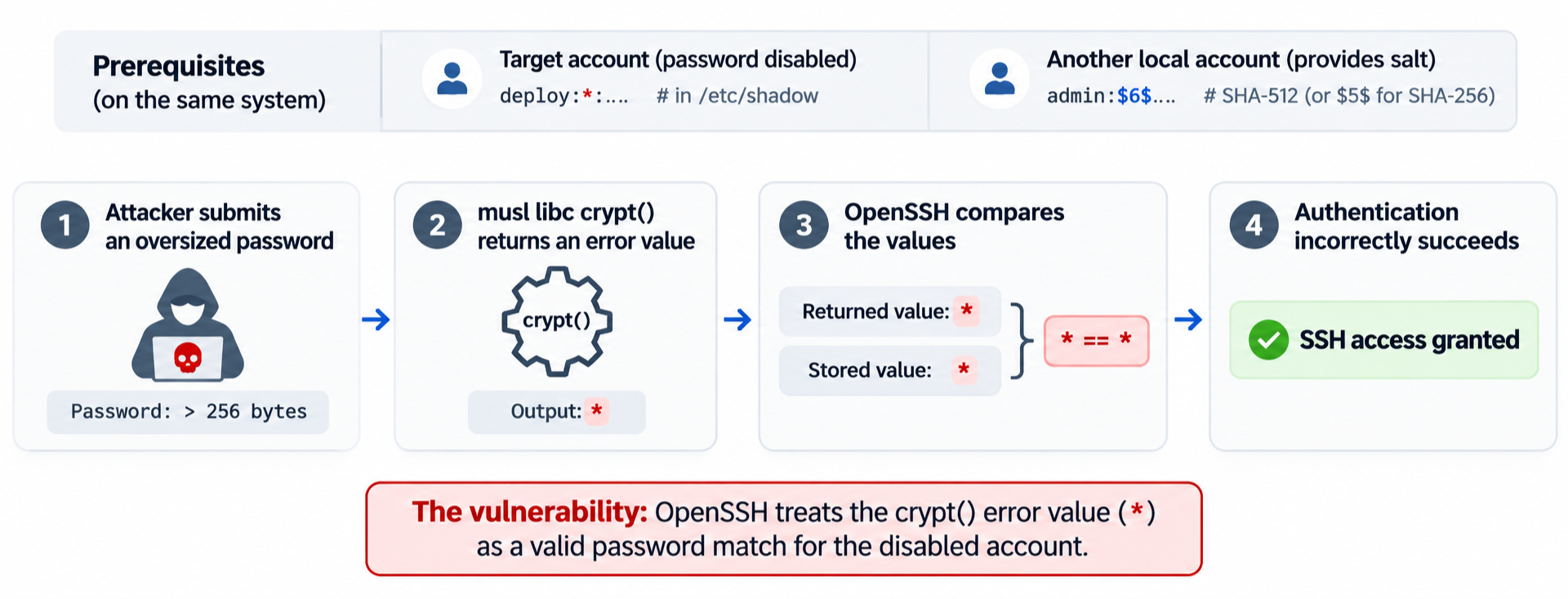
Figure 1: An oversized password triggers the * error value, which matches the stored password field of a disabled account, causing vulnerable OpenSSH authentication logic to accept the login.
The OpenSSH security fix prevents invalid password-hash values from satisfying the authentication comparison.
Are Your Systems Vulnerable?
Not every OpenSSH installation is affected. The bypass requires specific system and account conditions to coexist.
Exploitation prerequisites
All of the following conditions must be satisfied:
The attacker must also be able to reach the SSH service and identify a permitted target account. Other SSH access restrictions can prevent a usable session.
Environments to Prioritize
- Alpine Linux servers: Deployments running non-PAM OpenSSH with password authentication enabled.
- Alpine cloud images: Particularly affected tiny-cloud images containing the password-disabled alpine account with administrative privileges.
- Custom Linux systems and appliances: Musl-based deployments with OpenSSH configured without PAM.
- Alpine-based containers: Only those running a reachable, vulnerable SSH daemon.
Systems with password authentication disabled, OpenSSH using PAM, or no compatible password-hash condition are not exposed to this specific bypass. Accounts locked with ! are also not susceptible through the * comparison.
Important: OpenSSH version alone does not determine exposure. Alpine provides security fixes for older OpenSSH branches, so installed packages must be checked against the official fixed-version list.
Enterprise Impact: From Unauthorized SSH Access to Root Compromise
A successful SSHole attack grants access with the compromised account’s existing permissions. For enterprise, the consequences of SSHole depend on the privileges of the compromised account. While unauthorized SSH access is the immediate impact, attackers may also gain access to deployment credentials, application secrets, and connected infrastructure, potentially enabling lateral movement or service disruption.
Alpine Cloud Images: A Documented Path to Root Access
The official Alpine Linux advisory highlights a particularly significant scenario involving its tiny-cloud images.
Official Alpine cloud images from 3.18.11 through 3.24.3 include an alpine account with a disabled password and passwordless doas privileges.
These images are not automatically exploitable on first boot. However, introducing a compatible password hash elsewhere on the system, such as when an administrator sets a console password, can make the existing alpine account vulnerable.
Successful exploitation can then allow attackers to:
- Gain unauthorized SSH access to the alpine account.
- Execute commands as root through its existing passwordless doas permissions.
- Compromise the host and potentially connected infrastructure, depending on the availability of credentials and network access.
The enterprise risk: A routine administrative change can make a previously protected cloud instance exploitable without any modification to its SSH access policy.
SSHole in Action: From Authentication Bypass to Root Access
The following demonstrations illustrate the authentication failure and its potential consequences, comparing vulnerable and patched behavior before examining the path to privileged execution.
- Vulnerable vs. Patched: The Authentication Bypass
The same oversized-password attempt was tested against OpenSSH 10.6p1 and patched 10.6p2 builds, targeting a password-disabled deploy account.
The vulnerable build accepted the login without valid credentials, while the patched version rejected it. Normal password attempts were rejected on both builds.
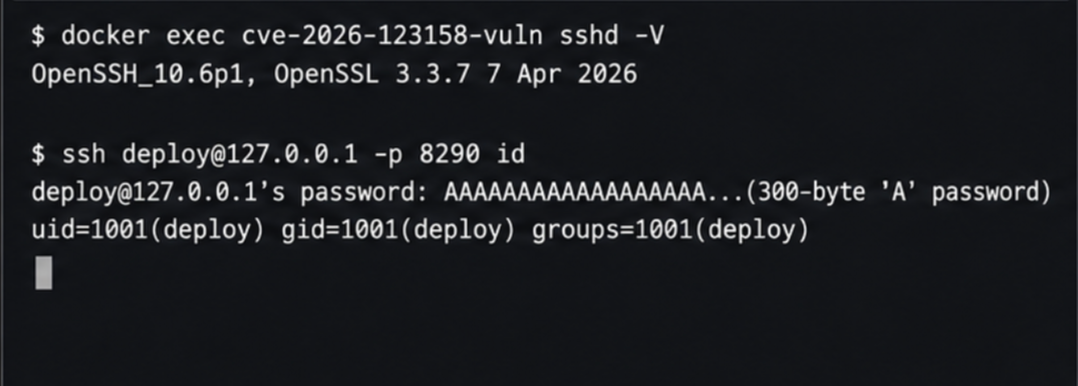
Figure 2: Successful SSH Authentication Bypass on Vulnerable OpenSSH 10.6p1
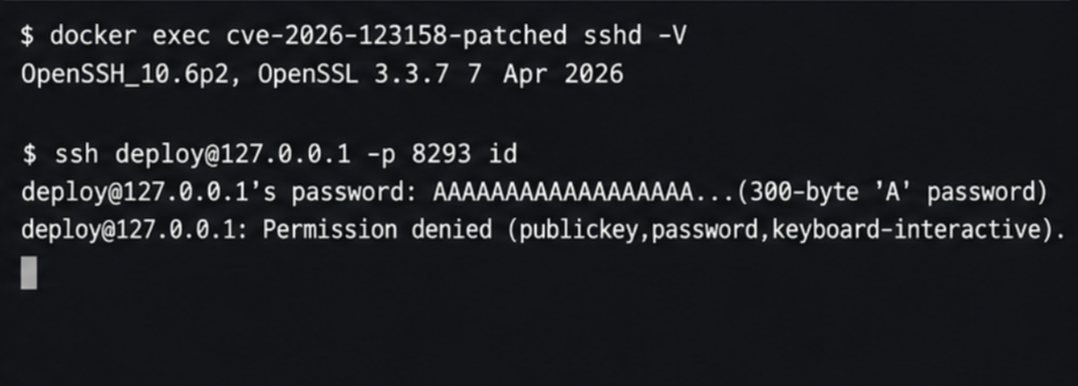
Figure 3: Authentication Bypass Blocked on Patched OpenSSH 10.6p2
- From Unauthorized Login to Root Access
The impact can extend beyond an SSH session. On certain Alpine cloud images, the default alpine account has passwordless doas privileges, creating a direct path to root access following successful exploitation.
A controlled demonstration can establish this using id to verify the compromised account and doas -n id to confirm root-level command execution.
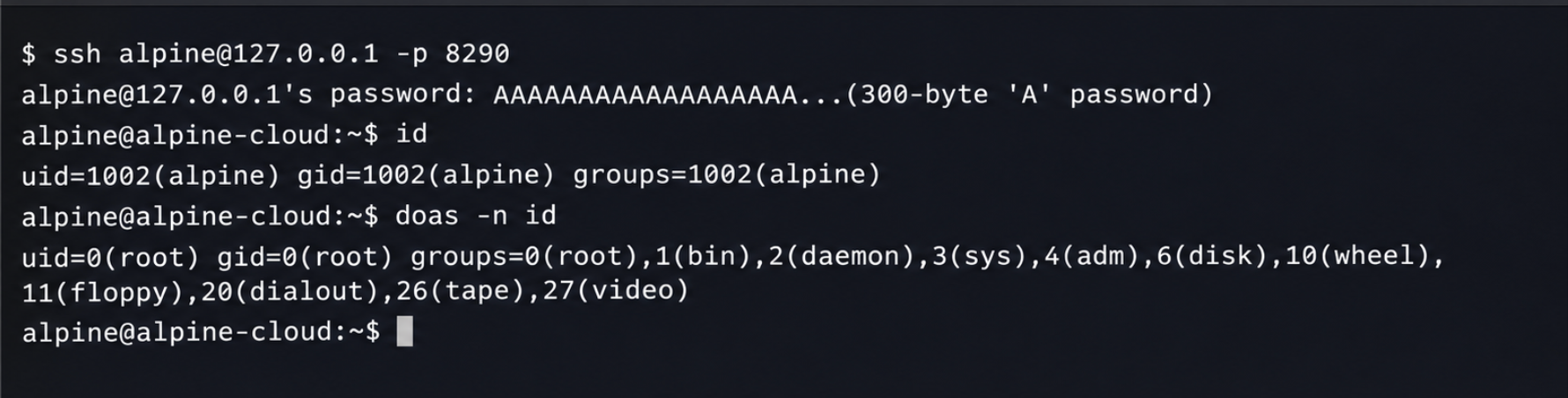
Figure 4: Unauthorized SSH access as the alpine account, followed by root-level command execution using existing passwordless doas privileges.
Detection and Mitigation: What Enterprises Should Do Now
1. Patch Affected OpenSSH Deployments
Upgrade to OpenSSH 10.6p2 or later, or install the appropriate fixed package for the deployed Linux distribution.
For Alpine Linux:
apk update && apk upgrade

rc-service sshd restart
Restarting sshd is necessary because upgrading the package does not replace the running daemon.
Verify the installed package against the Alpine fixed-version matrix. For containerized deployments running SSH, rebuild and redeploy affected images.
2. Disable Password Authentication
Where immediate patching is not possible, disable SSH password authentication and require key-based access.
PasswordAuthentication no
Validate the effective configuration:
sshd -t

sshd -T | grep '^passwordauthentication '
Confirm that authorized key-based login works before restarting the service. Review account-specific Match rules and verify the setting after restart.
3. Audit SSH Access and Privileges
Prioritize reviewing:
- Password-disabled accounts that can establish SSH sessions.
- Service and deployment accounts with access to sensitive credentials.
- Accounts with passwordless sudo or doas privileges.
- Unnecessary internet-exposed SSH services.
Restrict administrative access to approved management networks and remove excessive account privileges.
4. Hunt for Suspicious Authentication Activity
Review SSH authentication logs for unexpected successful password logins, especially involving service accounts configured for key-only access.
On Alpine systems using /var/log/messages:
grep 'Accepted password' /var/log/messages
Correlate suspicious logins with account password state, subsequent privileged command execution, and changes to SSH keys, user accounts, or system configuration.
Detection consideration: Standard SSH logs generally do not record the length of the submitted password. Successful password authentication against an account that had no usable password at the time of login is a more meaningful investigative signal.
5. Reduce SSH Exposure
Restrict SSH access to trusted management networks, VPNs, or bastion hosts. Remove unnecessary externally reachable SSH services and enforce least-privilege access across administrative and service accounts.
Network restrictions reduce the opportunity for exploitation but should complement, not replace, patching.
Beyond Vulnerability Detection With SAFE CTEM
SSHole demonstrates why identifying a vulnerable software version is only the starting point. Actual risk depends on the affected configuration, reachable attack paths, existing security controls, and the privileges an attacker could gain.
SAFE’s CTEM AI Co-Worker helps organizations connect these factors by validating reachability and exploitability, assessing control effectiveness, and prioritizing remediation according to business impact. This enables security teams to focus on exposures that present meaningful risk and verify that remediation has effectively closed them.
Related Posts
 Cybersecurity
10 Most Common Cybersecurity Blind Spots
Nearly 90% of cyberattacks are caused by human error, so it’s important to understand and address your organization’s cybersecurity weak spots. Many organizations struggle to maintain a clear…
 Product Updates
2025 in Retrospect: SAFE Steers the Industry Towards Autonomous Cyber Risk Management
2025 wasn’t just a milestone year for SAFE: it was the year the entire cyber risk management landscape shifted. Every major shift in the SAFEOne platform this year…